Sky Viper Dash Nano Drone User Guide

Sky Viper is a brand of consumer drones and remote-controlled aircraft manufactured by Skyrocket Toys, a company that specializes in producing toys and consumer electronics. Sky Viper drones are designed for recreational use and are known for their affordability, ease of use, and a range of features that make them suitable for beginners and hobbyists.
Key features and aspects of Sky Viper drones may include:
- Affordability: Sky Viper drones are often priced competitively, making them an attractive option for individuals who want to get into drone flying without breaking the bank.
- Ease of Use: Many Sky Viper models are designed to be user-friendly, with simple controls and features that make them accessible to beginners. They often come with user-friendly apps for controlling and monitoring the drone.
- Durability: Some Sky Viper drones are designed to withstand crashes and collisions, which is especially helpful for beginners who are still learning to fly.
- Camera Capabilities: Some models come equipped with built-in cameras that allow users to capture photos and videos from the air. The quality of the camera can vary depending on the specific model.
- Different Models: Sky Viper offers a range of drone models with varying features, sizes, and capabilities. This allows users to choose a drone that best suits their needs and preferences.
- Battery Life: The flight time of Sky Viper drones can vary depending on the model and the specific battery used, but most offer a reasonable amount of flight time on a single charge.
- Remote Control: Sky Viper drones typically come with a dedicated remote control, although some models can also be controlled via a smartphone app.
- Stability Features: Many Sky Viper drones include stability features such as altitude hold and one-touch takeoff and landing, which can make flying the drone easier for beginners.
POWERING UP AND PAIRING REMOTE
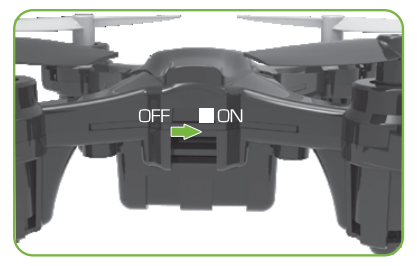
- Turn the drone on. (Be sure that the drone is completely charged. See reverse.)
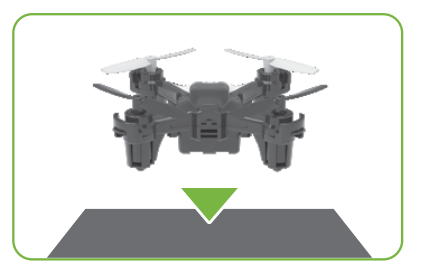
- Place the drone on a level surface for calibration.
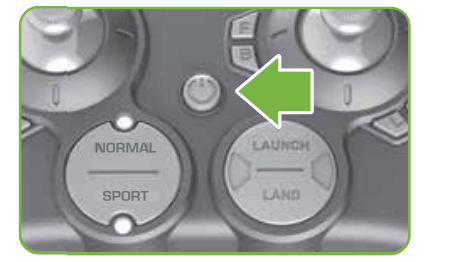
- Turn on the controller. (Before initial use, install new batteries into the controller. See Reverse.)
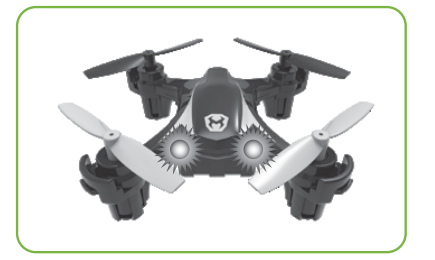
When LEDs turn solid, the drone is ready to fly.
FLIGHT BASICS

To make flying easier, place the drone on the ground in front of you with the drone facing away from you (green blades forward). You should be facing the same way the drone is facing.
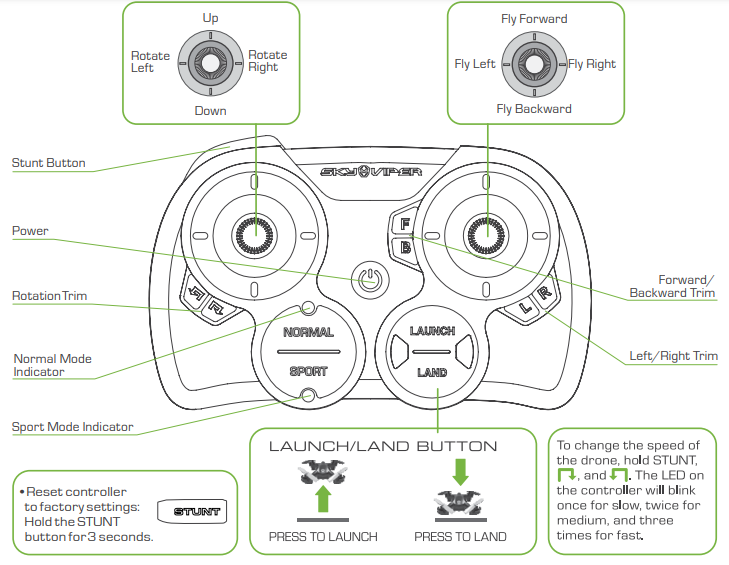
Press LAUNCH to automatically launch a few feet off the ground.
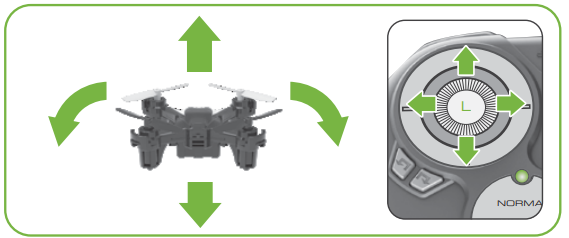
Move the LEFT (Throttle) thumbstick up or down to make the drone fly higher or lower and left or right to rotate.

Use the RIGHT (Directional) thumbstick to fly forward, backward, left, or right.
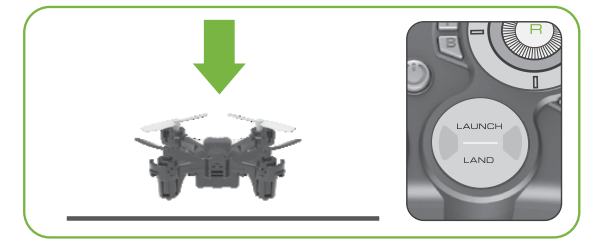
Press LAND to automatically land.
- Alternatively, you can use the left thumbstick to land the drone. Hold the left thumbstick all the way down for about 2.5 seconds after the drone has safely reached the ground, and the motors will stop spinning.
FLIGHT CONTROLS
Warning
If for any reason you need to immediately stop the drone, press and release the power button.
ONE TOUCH STUNTS
NOTE
Once a stunt has been initiated, DO NOT adjust Throttle or press any other controls until the stunt has been completed.

BARREL ROLL LEFT OR RIGHT
While flying forward (or reverse], tap the STUNT button.
FLIP IN 4 DIRECTIONS
- Bring the drone to a mid-air hover without flying in any direction. Remove the finger from the RIGHT thumbstick.
- While hovering, press and hold the STUNT button.
- Then quickly tap the RIGHT thumbstick in the direction you want the drone to flip.

CAUTION!
The drone should be flying at least 6 feet in the air with a minimum clearance of 6 feet in all directions before attempting stunt functions.
REPLACING DAMAGED BLADES


MAINTENANCE
CONTENTS
- Nano Drone
- USB Charging Cable
- Controller
- 4 Replacement Blades
Propellers Not Spinning?
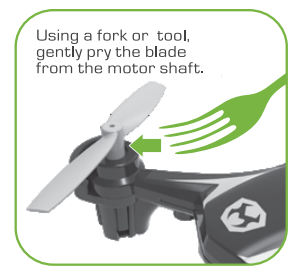
If one or more of your drone’s propellers will not spin, check for foreign objects on or around the motor and propeller. Remove the propeller with a fork or tweezers, clear debris, and then replace the propeller. Do not use excessive force when putting the propeller on the motor.
FAILSAFE GUIDE
- When the drone turns upside down, the motors will stop spinning.
- When the drone goes out of range of the controller, it will automatically land itself in its current position. If the controller comes back into range before the drone lands, it is possible to cancel this automatic landing by pressing up on the left thumbstick.
- When the drone’s battery is at 10% or less, the LEDs on the drone will begin to blink rapidly until the drone is turned off.
- When the drone’s battery is depleted, the drone will automatically land itself in its current position. This automatic landing cannot be interrupted by the controller.
- If the drone detects that no input has been received by the controller for 15 seconds, the drone will automatically land itself in its current position.
TRIM ADJUSTMENTS
- IF THE DRONE DRIFTS FORWARD: Press the “B” button several times until the drone stops drifting forward.
- IF THE DRONE DRIFTS BACKWARD: Press the “F” button several times until the drone stops drifting backward.
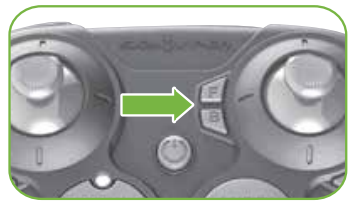
- IF THE DRONE DRIFTS LEFT: Press the “B’ button several times until the drone stops drifting left.
- IF THE DRONE DRIFTS RIGHT: Press the “L’ button several times until the drone stops drifting right.

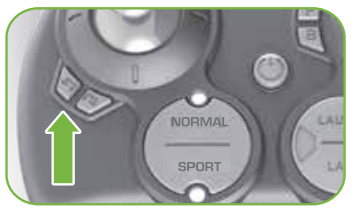
- IF THE DRONE SPINS COUNTER-CLOCK- WISE (VIEWED FROM ABOVE): Press the button several times until the drone stops spinning.
- IF THE DRONE SPINS CLOCKWISE [VIEWED FROM ABOVE): Press the & ] button several times until the drone stops spinning
TIPS
- When the controller LED flashes 3 times quickly, the trim is at the middle of the trim range.
- If you are uncomfortable trimming the drone in flight, you can land on a flat surface and make your trim adjustments.
- To reset trim adjustments, hold the L and the R buttons down for 2 seconds
CONTROLLER MODE SET-UP
When the controller is OFF, press and hold the flight mode button, LAUNCH/LAND button, and POWER button for three seconds to toggle between mode 1 and mode 2
- Mode 2 (default, most commonly used)
LEFT thumbstick makes the drone go up/down, and rotate clockwise/counter-clockwise. The RIGHT thumbstick makes the drone fly forward, backward, left, and right.
- Mode 1 is used in Australia and most Asian & European countries)
LEFT thumbstick makes the drone fly forward/backward, and rotate clockwise/counter-clockwise. The RIGHT thumbstick makes the drone go up/down, and fly left and right.
INSTALLING BATTERIES IN THE CONTROLLER
- Screwdriver not included.


- Batteries are not included.
ADULT SUPERVISION REQUIRED
Before each use, an adult should check this product and the LiPo battery to ensure no damage or hazards exist. The drone has rotating blades that move at high speed, posing danger of damage and injury. Pilots are responsible for any actions that result in damage or injury from the improper operation of drones. Adequate flying space is required. Avoid flying near interior fans and/or vents as they may make flying difficult to control. Keep a safe distance away from streets, public thoroughfares, and power lines. Never attempt to retrieve the drone from any location higher than your reach (such as rooftops or trees] or from any location that poses a safety hazard. Never fly a drone at night. Keep the drone in sight at all times during operation. Discontinue operation immediately if a drone flies out of your field of view. Do not fly near spectators or animals. Keep spinning rotors away from fingers, hair, eyes, and other body parts. Always launch from a flat surface. Never leave the drone unattended while it is turned on. Read all enclosed information before operating.
THIS PRODUCT CONTAINS A LITHIUM-POLYMER BATTERY 3.7V 100mAh:
LiPo batteries have a severe risk of fire and injury if they are improperly handled or misused. They may explode, overheat, or ignite. Read all the following precautions and instructions regarding the care and use of LiPo batteries. The LiPo battery is only to be used with the drone and charger included with this product.
- Keep away from flammable materials.
- Do not be exposed to direct sunlight.
- Do not place in fire or leave in hot places.
- Do not drop or make subject to strong impact.
- Keep dry and away from water.
- Remove the exhausted battery as soon as possible and discard it properly.
- Remove the battery from the compartment if the toy is not used for a long period.
- The supply terminals are not to be short-circuited.
- Never throw the battery in a fire or attempt to open the outer casing.
- Do not leave the battery connected to the drone when not in use.
- Do not stress, press, or drop the battery.
- Never charge the battery unattended. When charging batteries you should always remain in constant observation to monitor the charging process and react to potential problems that may occur.
- Disconnect with the charging wire if the battery is fully charged.
- Never store or charge the battery inside the car in extreme temperatures, since extreme temperatures could ignite a fire.
- Use caution to avoid puncture of the battery. Puncture of the battery may cause a fire.
LiPo Battery Disposal: LiPo batteries must be recycled or disposed of properly. They should not be disposed of with other household waste. Check your local laws and regulations for correct recycling and/or battery disposal.
AAA BATTERY CAUTIONS
- Do not use rechargeable batteries.
- Different types of batteries or new and old batteries are not to be mixed.
- Batteries are to be inserted using the correct polarity.
- Remove exhausted batteries as soon as possible and discard properly.
- Remove all batteries from the compartment if the toy is not used for a long period.
- Never throw batteries in a fire or attempt to open the outer casing.
- Non-rechargeable batteries are not to be recharged.
- The supply terminals are not to be short-circuited.
- Batteries should be replaced by an adult.
WARNING: Batteries are harmful if swallowed. Please keep away from children.
Battery Disposal: Dispose of batteries according to the local laws and regulations of your region. Some batteries may be recycled and may be accepted for disposal at your local recycling center. If you are not able to identify the applicable rules in your area, please check the instructions of the battery manufacturer.
NORMAL AND SPORTS FLIGHT MODES
- NORMAL mode is best for new pilots. Begin by pressing the LAUNCH button for takeoff. The drone will hold its altitude, and gradually fly up or down when you press up or down on the left thumbstick.

- SPORT mode is better for experienced pilots. When the left thumbstick is pushed up the drone will spin its motors as fast as it can while maintaining stability, and when the left thumbstick is pushed down the motors will stop spinning completely.

CHARGING THE DRONE 

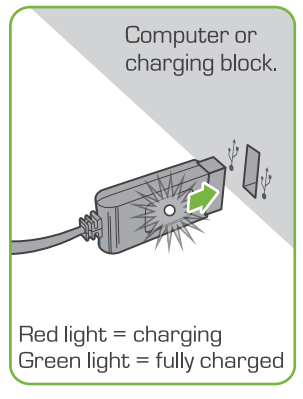
CHARGING PRECAUTIONS
- After use, allow the drone battery on the bottom] to cool down to room temperature before charging again.
- Charge the battery in an isolated area, away from excessive heat or moisture.
- If you suspect that the battery is damaged or swollen, discard the battery according to your country’s recycling laws.
- Do not modify, heat, or wet the battery in any way. Only recharge with the provided charger.
FCC
This device complies with PART 15 of the FCC Rules. Operation is subject to the following two conditions.
- This device may not cause harmful interference, and
- this device must accept any interference received, including interference that may cause undesired operation.
CAUTION: Changes or modifications to this unit not expressly approved by the party responsible for compliance could void the user’s authority to operate the equipment.
NOTE: This equipment has been tested and found to comply with the limits for a Class B digital device, under Part 15 of the FCC Rules.
These limits are designed to provide reasonable protection against harmful interference in a residential installation. This equipment generates, uses, and can radiate radio frequency energy and, if not installed and used by the instructions, may cause harmful interference to radio communications. However, there is no guarantee that interference will not occur in a particular installation. If this equipment does cause harmful interference to radio or television reception, which can be determined by turning the equipment off and on, the user is encouraged to try to correct the interference by one or more of the following measures:
- Reorient or relocate the receiving antenna
- Increase the separation between the equipment and the receiver
- Connect the equipment to an outlet on a circuit different from that to which the receiver is connected
- Consult the dealer or an experienced radio/TV technician for help.
Warning
- Remove all packaging attachments before giving the toy to a child.
- Not suitable for children under 3 years due to small parts that could be swallowed.
- Conforms to product safety standards ASTM F963.
- Keep instructions for future reference.
- Do not discard.
SKYROCKET
Google Play and the Google Play logo are trademarks of Google Inc. Apple and the Apple logo are trademarks of Apple Inc., registered in the U.S. and other countries. App Store is a service mark of Apple Inc., registered in the U.S. and other countries.
WE’RE HERE TO HELP
For questions about this product:
- Online:skyviper.com/support
- Email:support@skyrockettoys.com
- Phone: 1-888-674.5650
- M-F 9 am to 6 pm PST
- Online Video Instructions & Flying Tips are available now atSKYVIPER.COM
